Wednesday, February 10, 2010

Simple Annotation Based Spring Controller

The example below shows a simple annotation based spring contoller. Efforts has been made to keep the example as simple as possible.

1) Create a dynamic project in Eclipse ( used here is STS- Spring Source Toolsuite)


2) Jars needed: Place them in the WEB-INF/lib directory.
spring-webmvc
spring.jar
spring-context.jar
commons-logging.jar
jstl.jar
3) Create a controller in the src directory.

package com.yogi.test.Controller;
 
import javax.servlet.http.HttpServletRequest;
import javax.servlet.http.HttpSession;
 
import org.springframework.stereotype.Controller;
import org.springframework.web.bind.annotation.RequestMapping;
import org.springframework.web.servlet.ModelAndView;
@Controller
public class TestController {
 @RequestMapping("/HelloWorld.htm")
 protected ModelAndView onSubmit(HttpServletRequest request, HttpSession session) throws Exception {
 
  return new ModelAndView("helloworld.jsp");
 }
}

4) Update web.xml


<?xmlversion="1.0" encoding="UTF-8"?>
<web-app xmlns:xsi="http://www.w3.org/2001/XMLSchema-instance" xmlns="http://java.sun.com/xml/ns/javaee" xmlns:web="http://java.sun.com/xml/ns/javaee/web-app_2_5.xsd" xsi:schemaLocation="http://java.sun.com/xml/ns/javaee http://java.sun.com/xml/ns/javaee/web-app_2_5.xsd" id="WebApp_ID" version="2.5">
  <display-name>MySpringMVC</display-name>
  <welcome-file-list>
    <welcome-file>index.html</welcome-file>
  </welcome-file-list>
 
  <servlet>
    <servlet-name>MySpringMVC</servlet-name>
    <servlet-class>org.springframework.web.servlet.DispatcherServlet</servlet-class>
    <load-on-startup>1</load-on-startup>
  </servlet>
 
 
  <servlet-mapping>
    <servlet-name>MySpringMVC</servlet-name>
    <url-pattern>*.htm</url-pattern>
  </servlet-mapping>
</web-app>


5) Creat the application context in WEB-INF (in this case MySpringMVC-servlet.xml)
<?xml version="1.0" encoding="UTF-8"?>
<beans xmlns="http://www.springframework.org/schema/beans"
       xmlns:xsi="http://www.w3.org/2001/XMLSchema-instance"
       xmlns:util="http://www.springframework.org/schema/util"
       xmlns:p="http://www.springframework.org/schema/p"
       xsi:schemaLocation="
       http://www.springframework.org/schema/beans 
       http://www.springframework.org/schema/beans/spring-beans-2.0.xsd
       http://www.springframework.org/schema/util 
       http://www.springframework.org/schema/util/spring-util-2.0.xsd">
 
   <!--====================================================-->
   <!-- URL Handler Mappings-->
 <!--++++++++++++++++++++++++++++++++++++++++++++++++++++-->
  <bean id="urlMapping" 
      class="org.springframework.web.servlet.handler.SimpleUrlHandlerMapping">
    <property name="alwaysUseFullPath" value="true"/>
    <property name="mappings">
      <props> 
  <prop key="/HelloWorld.htm">helloWorldController</prop>
      </props>
    </property>
  </bean>
 
  <!--====================================================-->
   <!-- View Resolver -->
 <!--++++++++++++++++++++++++++++++++++++++++++++++++++++-->
 <bean id="view-Resolver"  class="org.springframework.web.servlet.view.InternalResourceViewResolver">
   <property name="viewClass">
      <value>org.springframework.web.servlet.view.JstlView</value>
   </property>
</bean>
 
  <bean id="helloWorldController" class="com.yogi.test.Controller.TestController" />
 
</beans>
6) Create JSP in Web-Content


DOCTYPE html PUBLIC "-//W3C//DTD HTML 4.01 Transitional//EN" "http://www.w3.org/TR/html4/loose.dtd">
<html>
<head>
<meta http-equiv="Content-Type" content="text/html; charset=ISO-8859-1">
<title>Insert title here</title>
</head>
<body>
MY FIRST SPRING MVC APPLICATION.
</body>
</html>

7) Build and Run the application. (Right click and click on Run As --> Run on Server)
8) The package explorer should look something like this: 

Tuesday, September 8, 2009

EJB and Hibernate notes

EJB

*Session Bean -- stateful and stateless
* Entity Bean
* Message Driven Bean

EJB Architecture
* A remote interface -- a client interacts with it
* A home interface -- used for creating objects and for declaring business methods
* A bean object -- an object which actually performs business logi cna EJB-specific operations
* A deployment descriptor -- ( an XML file containing all information required for maintaining the EJB) or a set of deployment desciptor.
* A primary key class - is only entity bean specific.

[http://www.comptechdoc.org/docs/kanti/ejb/ejbarchitecture.html]

Entity Bean
* represent data in the database.
* most of the time container takes care of the persistence, transaction and access control while developer can focus on the bean logic.

Container Managed Bean
* all the logic for synchronizing the bean's state with the database is handled automatically by the container.
* developer does not need to write any data access logic.
* container takes care of persistence.

Bean Managed Persistence
* developer can handle the persistence if needed.
* developer can handle the data source.

ORM
ORM is the automated persistence of objects in Java application to the tables in a relational database.

Hibernate
*persistence framework
*pure java object relational mapping.
*maps POJO to relational database tables.
*relieves developr from persistence related programming task.
*hibernate.cfg.xml - hibernate configuration file
* *.hbm.xml -- mapping file, tells which tables and columns to use to load and store objects.
*hibernate.properties - resource bundle

session
*light-weight and non-threadsafe object
*sessionFacotry creates session and then closes it once work is done.

Hibernate Persistent Class (Hibernate Bean)
* just another regular bean class.
* setters and getters, no arg constructor
* can override the equals() and hashcode() methods.
* the persistent class should not be final.

JDBC and Database related notes

JDBC Connection steps

* loading driver class - Class.ForName("driver class").newInstance();
* Connection - Connection con = DriverManager.getConnection("databaseurl","username","passwprd");
* statement - Statement stmt = con.CreateStatement();
* execute sql - stmt.executeQuery("query");
* get data from resultset - rst.getString("column_name");

Auto Commit

con.setAutoCommit(false);
.........................
.........................
(transaction statements)
.........................
.........................
con.setAutoCommit(true);

Calling Stored Procedure


CallableStatement cs = con.prepareCall("call show_supplier");
Resultset rs = cs.executeQuery();  
Warnings(SQL)

To handle sql warning connection, statement, resultset each object can invoke a method called getwarning. [con.getWarning();]

JDBC driver types

Type1:- JDBC-ODBC bridge
Type2:- Native API partly Java Driver
Type3:- Network Protocol Driver
Type4:- JDBC Net pure Java Driver

Logging JDBC

DriverManager.println();

SQL Locator
A locator is a SQL3 datatype that acts as a logical pointer to data. Used to handle- array, blob and clob data.

Transaction Isolation Level
* 4 levels
* Connection.setIsolationLevel()
* Isolation Levels
TRANSACTION_READ_UNCOMMITTED
TRANSACTOIN_READ_COMMITTED
TRANSACTION_REPEATABLE_READ
TRANSACTION_SERIALIZABLE

Anomalies
* Dirty Reads
* Non-repeatable reads
* Phantom reads

Metadata
* two important classes : DatabaseMetaData and ResultsetMetaData
DatabaseMetaData.getImportedKeys() returns a resultset with data about foreign keys etc.


Locking
Pessimistic Locking: - good for data integrity, bad for concurrency, defensive approach, lock the data and always expect that someone can access the interim data before it gets updated.

optimistic Locking:- exptects that a clash between multiple updates to the same data will seldom occur.

batch updating
stmt.addBatch(SQL statment here);
................................
................................
stmt.executeBatch();
stmt.clearBatch();

Saturday, July 25, 2009

JDK and JRE version conflict: major.minor version 50.0

The error mentioned above in the post heading is a frequent arrival when different version of jdk and jre conflict. This error occurs when somebody compiles a program with higher version of javac and tries to run with lower version of jre or vice-versa.

For example:

#javac -version
javac 1.6_0_10

#java -version
java version "1.3.1_01"
java(TM) 2 Runtime Environment, Standard Edition (build 1.3.1_01)
Java HotSpot(TM) Client VM (build 1.3.1_01, mixed mode)

Solution - Temp

1. Download Jre1.6 or whatever version same as the javac version.
2. Manually set path to the new jre.
3. open a command window and type

#set path="C:\Program Files\Java\jre1.6_0_10\bin";

3. Now, for this session of the cmd window whenever you invoke java -- new jre will be invoked.

Sunday, July 19, 2009

Hibernate

Few hibernate tutorials:

1. https://www.hibernate.org (Hibernate core and annotations downloads)
2. https://www.hibernate.org/255.html (Hibernate Eclipse Plugin)
3.https://www.hibernate.org/hib_docs/tools/viewlets/createcfgxml_viewlet_swf.html (introductory video)
4. http://www.roseindia.net/hibernate/firstexample.shtml (First example)

A simple Hibernate implementation with a POJO object. (Eclipse)

Step1:
** Create a simple Java project in eclipse.
** Configure the build path and add hibernate.jar and mysql-connector-driver.jar in it.
**Further include all the required jar files. (see the hibernate distribution and all the jar files that are in the required folder.)
** Download sl4j from http://www.slf4j.org/download.html and include any one of(and only one) slf4j-nop.jar, slf4j-simple.jar, slf4j-log4j12.jar, slf4j-jdk14.jar or logback-classic.jar in the build path.
**** Be very careful not to mix different version of sl4j. Use the same version of sl4j-api.jar and any one of the above mentioned jar files. If mixed an error will occur that read:

java.lang.IllegalAccessError: tried to access field org.slf4j.impl.StaticLoggerBinder.SINGLETON from class org.slf4j.LoggerFactory at org.slf4j.LoggerFactory.(LoggerFactory.java:60)

**
The Java build path libraries should look like:
5. Now create a JavaBean. This bean maps to a table called user which stores id, username and password information in a mysql database.

package yogidilip.tutorial;

public class HibernateBean {

private String username;
private String password;
private long id;

public String getUsername() {
return username;
}
public void setUsername(String username) {
this.username = username;
}
public String getPassword() {
return password;
}
public void setPassword(String password) {
this.password = password;
}

public long getId() {
return id;
}
public void setId(long id) {
this.id = id;
}
}

6. Create a bean implementation class. This is the man hibernate implementation class. It uses the session factory to read the hibernate configuration file and opens the connection to the database.

package yogidilip.tutorial;


import org.hibernate.MappingException;
import org.hibernate.Session;
import org.hibernate.SessionFactory;
import org.hibernate.cfg.Configuration;


public class HibernateImpl {

public static void main(String[] args) throws MappingException {
Session session = null;

try{
//this step will read hibernate.cfg.xml
SessionFactory sessionfactory = new Configuration().configure().buildSessionFactory();
session = sessionfactory.openSession();

//Create new instance of user and set values in it by reading them from form object

System.out.println("Inserting Record");
HibernateBean user = new HibernateBean();
user.setId(7);
user.setUsername("Dilip");
user.setPassword("Rachana");
session.save(user);
/*session.beginTransaction().commit();*/
System.out.println("Done");
}
catch(Exception e){
System.out.println(e);
}
finally{
session.flush();
session.close();
}
}

}

7. Create a hibernate.cfg.xml file in the src directory. This file will contain all the database related connection information.

<?xml version="1.0" encoding="UTF-8"?>
<!DOCTYPE hibernate-configuration PUBLIC "-//Hibernate/Hibernate Configuration DTD 3.0//EN"
"http://hibernate.sourceforge.net/hibernate-configuration-3.0.dtd">
<hibernate-configuration>
<session-factory>
<property name="hibernate.connection.driver_class">com.mysql.jdbc.Driver</property>
<property name="hibernate.connection.url">jdbc:mysql://localhost/User</property>
<property name="hibernate.connection.username">root</property>
<property name="hibernate.connection.password">admin</property>
<property name="show_sql">true</property>
<property name="dialect">org.hibernate.dialect.MySQLDialect</property>
<property name="hibernate.hbm2ddl.auto">update</property>
<!--<property name="hibernate.dialect">org.hibernate.dialect.MySQLDialect</property>
--><mapping resource="user.hbm.xml"/>
</session-factory>
</hibernate-configuration>


8. The actual ORM mapping file user.hbm.xml should look like.

<?xml version="1.0"?>
<!DOCTYPE hibernate-mapping PUBLIC
"-//Hibernate/Hibernate Mapping DTD 3.0//EN"
"http://hibernate.sourceforge.net/hibernate-mapping-3.0.dtd">
<hibernate-mapping>
<class name="yogidilip.tutorial.HibernateBean" table="USER">
<id name="id" type="long" column="ID" >
<generator class="assigned"/>
</id>

<property name="username">
<column name="USERNAME" />
</property>
<property name="password">
<column name="PASSWORD"/>
</property>
</class>
</hibernate-mapping>

9. The mysql syntax for creating the database and table user should look like.

CREATE DATABASE User;

CREATE TABLE user (
id INT NOT NULL AUTO_INCREMENT ,
username VARCHAR( 255 ) NOT NULL ,
password VARCHAR( 255 ) NOT NULL ,
PRIMARY KEY ( id )
) TYPE = INNODB;

10. To run the example the HibernateImpl.java file can be run as a regular Java program. If everything goes well you should be able to see a success message that looks like.

log4j:WARN No appenders could be found for logger (org.hibernate.cfg.Environment).
log4j:WARN Please initialize the log4j system properly.
Inserting Record
Done
Hibernate: insert into USER (USERNAME, PASSWORD, ID) values (?, ?, ?)

11. This post is a modified version of the tutorial http://www.roseindia.net/hibernate/firstexample.shtml at roseindia.net . All the credit goes to the author of the above tutorial.

Saturday, July 4, 2009

Weblogic Tutorial

Collection of some Weblogic Tutorials.

1. http://edocs.bea.com/wls/docs70/adminguide/startstop.html -- Starting and Stopping server.
2. http://egeneration.beasys.com/platform/docs81/confgwiz/index.html -- Configuring domains and templates.

Saturday, April 11, 2009

Java Interview Questions

For the past few days I have been reading a lot about probable java interview questions. Finally, I thought to share it and here is what I have got. For now I will add some fundamental questions and answers and keep the post updating as I come across more. I have tried to put the answer as brief as possible so as it would be easy to remember. Answers here are taken from different Java books one being "The Complete Reference".

Fundamentals:

class: a template for object.
object: instance of a class.
constructor: initializes an object immediately upon creation.

Data Types:
Primitive: byte, short, int, long, char, float, double, and boolean
byte:- 8 bit
short:- 16 bit
int :- 32 bit
long:- 64 bit
float:- 32 bit
double:-64 bit

char:- 16 bit; 8 bit in C/C++; represents unicode.

final variable: value never changes
final method: can't be overridden
final class: can't be extended; all methods are implicitly final

access modifiers: public, private, protected
public: accessible by any other code.
private: is not accessible outside the class.
protected: seen outside the current package, but only to classes that subclass the class directly.
default: accessible in the same package.

static: any member declared static can be accessed before any object of its class are created, and without reference to any object. If a field or method is defined as static then there is only one copy for entire class rather than one copy for each instance. Static methods cannot access non-static field or call non-static method.

static variables: usually global variables; no copy is made
static methods: can only call other static methods; must only access static dta; cannot refer to this or super.

abstract class: cannot be instansitaed but can be extended.
abstract methods: with no method body, should be inside and abstract class.
Interface: abstract class with only abstract methods.

polymorphism: one interface, multiple methods
method overloading: parameter defines the method implementation.
method overriding: in inheritance; subclass overrides the superclass's method with same signature and parameter; name and type signature hast to be same or else they will be just overloaded.

super(): calls the constructor of the superclass

Advanced Java:

finalize() : free resources captured by any Java object.

Object Serialization: Writing an object and re-constructing the same object back in the exact form is known as object serialization. Object serialization is used in Remote Method Invocation (RMI)--communication between objects via sockets and for lightweight persistence--the archival of an object for use in a later invocation of the same program which is possible through JDBC. Serialization can be done with the helo of the interface Serializable.

Serialization: mechanism by which user can save the state of an object by converting it to a byte stream.

Connection Pool: Connection pool is about an application server storing the database connection information in order to reuse it again. If there is a connection pool every time if any request is made the system does not have to create a new connection. Connection pooling is popular in web based data driven application and Enterprise applications.

Map and HashMap :- Map is an interface whereas HashMap is a class that implements Map.
Vector and ArrayList :- Vector is synchronized and Arraylist is not. whenever multiple threads are supposed to access the same instance vectors should be used else Arraylist should be used. Arraylist gives better perfromance in non-synchronized case.

Swing and AWT:- Swing has light components whereas AWT has heavy-weight components.
Java supports passing by value.
wrapper classes: specialized classes corresponding to each of the primitive data types like Integer, Character Double.

checked exceptions: checked exceptions are those that the compiler force to catch like IOException.

J2EE

Saturday, November 15, 2008

Using John the Ripper for detecting weak passwords

John the Ripper(JTR) is a free password cracking software tool. Initially developed for the UNIX based environment, it currently runs on fifteen different platforms (11 architecture-specific flavors of Unix, DOS, Win32, BeOS, and OpenVMS). It is one of the most popular password testing/breaking programs as it combines a number of password crackers into one package, auto-detects password hash types, and includes a customizable cracker [wiki].
Few weeks back in my "Network and Information Security" class I was assigned to crack a password file. The password file was a unix based password file with 447 password hashes. I first tried to start JTR in Ubuntu, and downloaded the Unix src of JTR from http://www.openwall.com/john/ . To build the program in Ubuntu I first unzipped the tar :

dilip$tar -xzf john-1.7.2.tar.gz

then changed the folder to the run folder inside the john-1.7.2 directory

dilip$cd john-1.7.2

dilip$cd run

Here we can see a make file. I tried running the make.

dilip$make

Now, at this point the make returns a number of options for the platform its being build on. For ubuntu I did not saw any speicific platform option so I went with the generic one.

dilip$make clean generic

If everything goes well then the john executables will be created in the same directory as run. Now, to start cracking the password I ran the command.

dilip$./john passwd

where passwd is the password file that contains the password hashes. This should be all for John to start cracking the password. Optionally, john also takes some password list to compare with the password file. The password list are basically a huge collection of word lists or dictionaries. Lot of these kind of world lists can be found in the internet. Even different kind of wordlists can be downloaded from different sites and combined in one file using any .txt file joiner as all these wordlists are in .txt format. The command to supply a wordlist is:

dilip$./john w:wordlist.txt passwd

where wordlist.txt is the wordlist created.

In Windows
John also works on windows. For that a windows version of John should be downloaded from http://www.openwall.com/john/. In contrast to linux version, John in windows is reaady to use once you extract the john zipped folder. John can be invoked from the windows command line and supplied the password or wordlist as mentioned above. For windows I used:
C:>/john-mmx passwd
where mmx option utilizes the mmx feature of the processor.
John takes a long time depending upon the speed of the processor and the length of the password file. I kept it running for about 2 weeks to get just 75 password :).

Links for some wordlists:
ftp://ftp.cerias.purdue.edu/pub/dict/dictionaries/English/
ftp://ftp.ox.ac.uk/pub/wordlists/
http://sourceforge.net/project/downloading.php?groupname=cracklib&filename=cracklib-words.gz&use_mirror=voxel
http://www.openwall.com/wordlists/

Thanks,

Wednesday, October 22, 2008

Adding Apache Tomcat Server 5.5 to NetBeans IDE 6.1

Since few days I was thinking of writing some Java servlets with NetBeans IDE. I downloaded and installed NetBeans IDE 6.1. I was about to write my first servlet, but I came to know that Apache Tomcat server was no more bundled with NetBeans 6.1 and that I have to add it separately as an external server, which was a little bit irritating news but with no other options I have to add it.
I then downloaded the 5.5 version of Apache Tomcat. To add as an external server I was supposed to download the zipped version of the server rather then the windows installer. I downloaded the server from the Apache site http://tomcat.apache.org/download-55.cgi and then unzipped in c:\ in my hard drive.
Now, I first have to create a servlet project. I opened the NetBeans IDE. Clicked on File--> New Project. I choose the Web Application project.
After giving the name and location of the project when I clicked on the drop down button to see the server list I was able to see only the GlasFishV2 Server.

So, now at this point I clicked on the add button and showed the path to the Apache Tomcate server that I had unzipped early (in c:\).

To successfully add the server I have to make some changes on the configuration of the server. Mainly add an user. So while adding an user there is an option to create an user (a checkbox), I checked on that which created me an user. For more information please follow this wiki link http://wiki.netbeans.org/AddExternalTomcat
After successful addition of the server it did showed up in the dropdown for the server list.

I continued clicking on next and finally finish. I didn't selected any frameworks because I was going to create a generic servlet. Finally I clicked finished and everything was setup and I was ready to write my first servlet with NetBeans.

thanks

Tuesday, October 21, 2008

DNS goes down in XP service pack 3

Since few days back I am having a weird problem. My internet seems to work fine for some time and suddenly it crashes and I can't browse pages. When I run the MSN troubleshooter, I can see that the problem is with the DNS Suffix. Even if I type the ip add of a web page directly in the address bar, the page is displayed successfully. Till now my research in this issue points that its an issue with the Windows XP service pack 3 (by the way as far I remember I started having this problem sometime after I installed service pack 3). Now, I don't know what to do..whether uninstall service pack3 and fall back to service pack 2( which I really don't want to do) or look for some other solutions.
Related links:
http://forums.techarena.in/windows-xp-support/1023601.htm

Thursday, October 2, 2008

X-Server problem in Ubuntu


I am still stuck with the X-Server problem in Ubuntu. Here is the image and the error I get when I turn on my Ubuntu Virtual Machine. Any suggestions and solutions will be highly appreciated.

The original problem was described on :
http://yogidilip.blogspot.com/2008/09/ubuntu-server-as-virtual-machine-on-xp.html#links

Sunday, September 28, 2008

j42uRiLs.exe:--What is this..?

My computer has been acting weird since few days. Especially its very slow and my internet browsing speed has also declined. Further, I get some splash screen, showing some add for few second. When I looked on my task manager I can see internet explorer running as a process..but there is no IE window on my screen (probably its the add that's splashing up).... So, I scanned my whole computer with Malwarebyte's Anti Malware (see the previous post about it). It finally detected "j42uRiLs.exe" as a Trojan Agent and asked to delete it. I deleted it and it seems like its working fine. If anyone has encounter a similar situation or the process please give me some tips.

thanks,

Thursday, September 18, 2008

Playing with Goolge Chrome

Still playing with it :)
I installed the new browser from Google--Google Chrome. I started playing with it. In overall it looks good. I had fun using it. The tab browser system, the no menu sytem, the bookmark bar system everything was cool. The only thing that worried me was about the security issue. I saw a number of articles in web talking about the security vulnerability issues in Google Chrome. I post here some of the links: 

Google Chrome was one of the most awaited browser. In a very short span of time it has become quite popular. But the security issues that raised in just the first week of the release was a serious concern. The later version of the browser will probably not have those vulnerabilities. In overall, its predictable that Google Chrome is going to be one of the most popular browser in near future. 

Tuesday, September 16, 2008

X Server problem in Ubuntu Server 8.4

As, I mentioned in my earilier post, (http://yogidilip.blogspot.com/2008/09/ubuntu-server-as-virtual-machine-on-xp.html#links) I installed a virtual Ubuntu Server 8.04 on my XP. Now the problem is that I cannot run startx in Ubuntu. Whenever I type the command it gives me some error:
 error X: cannot stat /etc/X11/X (No such file or directory), aborting. ...Unable to connect to X Server.
I don't know what's goin on? I am trying to figure out this problem. Once I got the solution, I will post it here. Any suggestions or solutions is highly appreciated.

thanks,

Sunday, September 14, 2008

Antivirus XP 2008 License Agreement REMOVAL

Oh my God! it took me one complete day to figure out what the hell is "Antivirus XP 2008 License Agreement" popup and remove  it.  Everytime I boot my computer a popup would pop up asking me to install the Antivirus XP 2008. Further, there would be a big warning message in my desktop stating that my computer has been infected and I need to install some anti spyware software (see the image in the preivous post). 
I did a little bit research in this and found that "Antivirus XP 2008" popup was a fake popup and all those messages about my computer infection were fake and were displayed so as to convince me to buy the Antivirus XP 2008 anti-spyware software. I tried a number of anti-spyware software and finally a sofware named "Malewarebyte's Antimalware", a freeware, helped me remove it. This software did an excellent job in removing all of the infected files and registry keys. Now my computer acts as normal and I am happy. 
Instructions to remove "Antivirus XP 2008 License Agreement"
--> Go to the page
--> Download the Anti-Malware tool
--> Scan your computer with the tool.
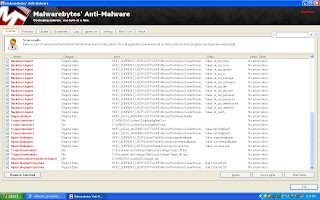
-->The tool will find all the malware's and trojans. The scan screen will look something like this:

-->Delete all the infected files and restart the computer. 
--> Now if everything goes well, you should be free from the malware and the pop up screen for "Antivirus XP 2008 License Agreement" should not show up. 
The complete instruction on using the malware byte is in the above link.

Thanks

Adware.CWSIEFeats detected


I was surfing internet yesterday and somehow an adware named Adware.CWSIEFeats got installed in my computer. I immediately came to know about it because it changed my desktop background. My desktop background looked like something shown in the image. 

Then I ran my Symantec Antivirus and scaned the whole system. The scan found a couple of adware with the name mentioned above.  
Then I googled it and found the symantec response page for the adware; http://www.symantec.com/security_response/writeup.jsp?docid=2004-120817-5800-99&tabid=2

. I manually deleted those .exe files from my computer and then restarted the computer. After that the background screen is gone but still my computer does not acts normal. Especially if anyhow I launch the IE..the computer freezes and I have to manually restart the computer. At this point, I guess its because of the registry keys the adware has added in my system. I am yet to figure out this and completely slove the problem. Any suggestions and solutions is highly recommended. 


thanks

Sunday, September 7, 2008

Ubuntu Server as a Virtual Machine on XP

From a long time I was planning to install a Virtual Server on my Dell Laptop (with XP). It took me a long time to which VM should I load on. Finally, last week I ended up with installing Ubuntu Server 8.0. Sequentillay I;
  • downloaded Vmware Server from http://www.vmware.com/download/server/
  • registered on the same page and obtained a free serial number for the VMware Server.
  • downloaded the Ubuntu Server from http://www.ubuntu.com/getubuntu/download
  • installed the VMware Server.
  • Created a Virtual Machine in VMWare Server.
  • Edited the boot options in the virtual machine to be booted by the iso image rather then the cd.
  • started the virtual machine and everything works as charm.
thanks,
I will post the snapshots of this story very soon. :)

Tuesday, July 1, 2008

Using Gparted with Dell Vostro 1500

I was planning to make a Fat32 partition on my hard drive to use it with knoppix. I downloaded the Gparted ISO image and burned it into a CD. Those who don't know what is Gparted: it's a debian based linux utility software basically used to resize, move and create partition. This is what i did and got stucked.
  1. Boot the system with the Gparted cd.
  2. Do everything as said in the screen.
  3. Finally, the problem occurred when the X-server crashed continuously.
  4. This is how I solve the problem
    1. sudo Forcevideo (it means type "sudo Forcevideo" in the prompt that occurs after the X-server crashes) the X-server and choose the option medium.
    2. Supply keyboard configuration as P101
    3. Reply "No" to Video Hardware detection.
    4. Choose "Vesa" as the driver
    5. Reply "No" to Kernel Frame Buffer.
    6. Reply "No" to Monitor auto detection.
  5. This should be all to reconfigure the X-server. Now in the prompt type "sudo startx".
  6. Now you should be able to run the X-server.
Thanks, Let me know if there are any questions or concerns.

Wednesday, May 21, 2008

A Simple Graphics Editor in JAVA

After a bit of practice on JMF..now I wanna get a hand on java awt package. So, what I thought is I am going to make a simple graphics editor in java...that can draw different 2D geometrical figures and manipulate those figures. I have just started it...lets see how far can I get. If you guys have any suggestions please feel free to leave comments.

thanks.